Methods vs Functions
We have already used a lot of functions throughout
this course. Built in functions that Python provides like
print(), min(), max(),
len(), range(), enumerate(),
list(), int(), str() and
many more. You can find the full list of Python's built in functions
in the official documentation:
We have also learned how to create our own functions to do whatever we need:
All of these are functions. We call them by typing the function name followed by parentheses that either contain arguments or are left empty.
Methods
Methods work differently. Instead of being called by name on their own, methods are called using dot notation. You type the data first, then a dot, then the method name and parentheses. For example:
"test".capitalize()
You have already used methods throughout this course. String methods, list methods, dictionary methods and set methods. Here is a full reference for Python string methods:
Python String Methods Reference
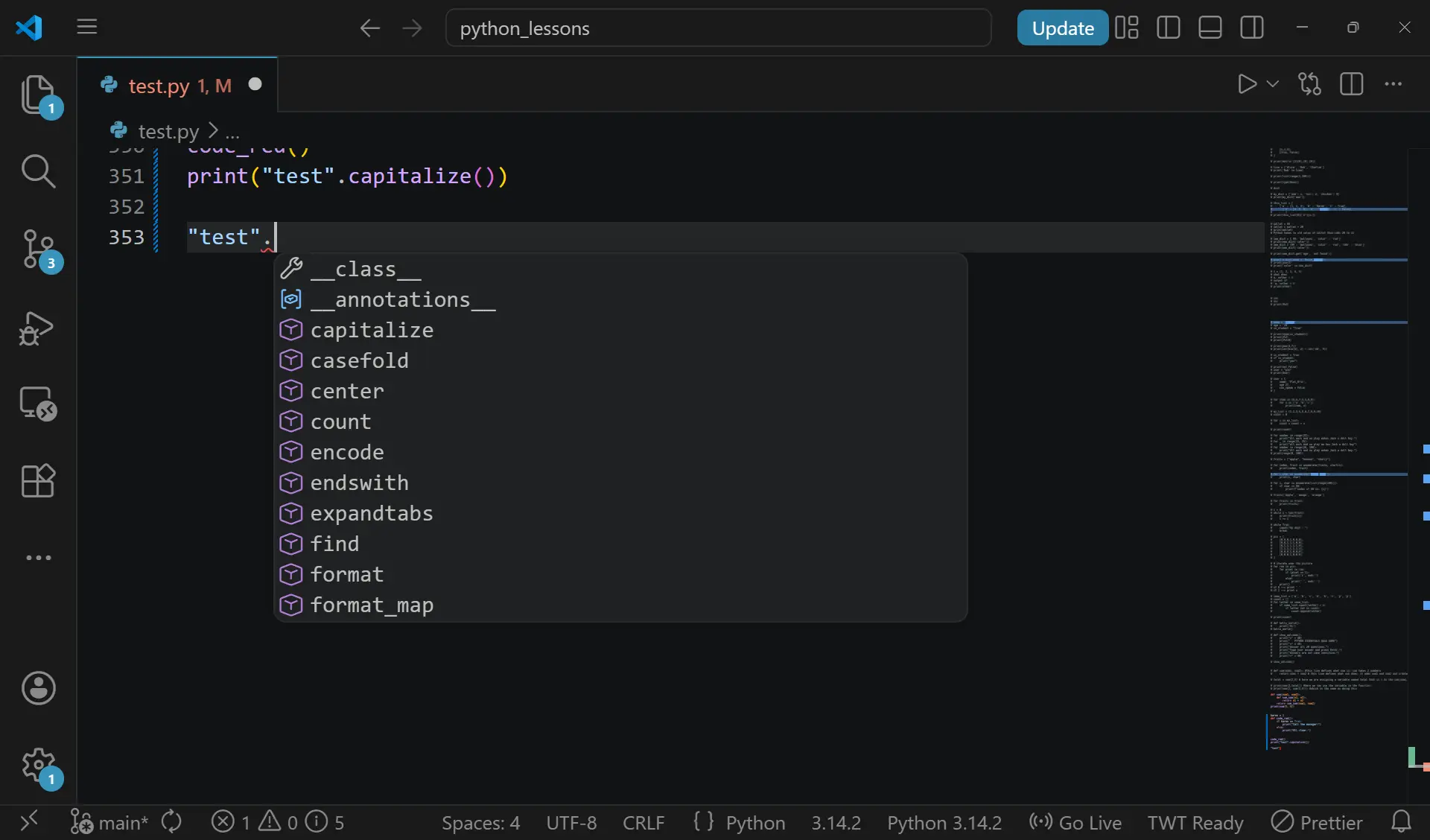
If you type a string in your editor and add a dot after it, Python will show you a list of every method available for that data type:
The Key Difference
The most important thing to understand about methods is this: a method belongs to whatever is to the left of the dot. The method is owned by the data it is called on. It cannot exist on its own.
If you try to call a method like a function, for example typing
capitalize() on its own without anything to the left
of it, Python will throw a NameError because
capitalize() is not a function. It does not exist
independently. It only exists as a method that belongs to a string.
Methods are available on all different data types. Strings, lists, tuples, dictionaries and sets all have their own set of methods designed specifically for that data type. A list method will not work on a string and a string method will not work on a list.
The best way to learn methods is to use them. Try them, break them, read what they do in the documentation and experiment. The official Python documentation is your best resource and one you will return to constantly throughout your coding journey:
Time to experiment!
Coding Exercises (VS Code) Instructions:
- Create a file named methods.py in your part52 folder.
- Complete the tasks and use # comments to explain your answers.
- Use the Python documentation and method reference lists to find the methods you need. Part of this exercise is learning how to find answers yourself.
Exercise 1: String Methods
-
Task: Create a variable
sentence = " the quick brown fox jumps over the lazy dog ". - Goal: Using only string methods find and use the correct methods to do the following in separate print statements:
- Remove the whitespace from both ends of the string
- Capitalise the first letter of every word
- Convert the entire string to uppercase
- Count how many times the letter
"o"appears - Replace the word
"lazy"with"energetic" - Reference: Python String Methods
Exercise 2: List Methods
-
Task: Create a list
numbers = [5, 2, 8, 1, 9, 3, 7, 4, 6]. - Goal: Using only list methods find and use the correct methods to do the following, printing the list after each change:
- Sort the list in ascending order
- Reverse the list
- Add the number
10to the end of the list - Remove the number
1from the list - Find the index position of the number
7 - Reference: Python List Methods
Exercise 3: Dictionary Methods
-
Task: Create the following dictionary:
student = {'name': 'Eric', 'age': 27, 'language': 'Python', 'grade': 'A'}. - Goal: Using only dictionary methods find and use the correct methods to do the following:
- Print all the keys
- Print all the values
- Use a method to safely retrieve a key that does not exist without throwing an error
- Add a new key
"country"with the value"Thailand"using the.update()method - Remove the
"grade"key using a method that also returns the value that was removed - Reference: Python Dictionary Methods
Exercise 4: Research Challenge
-
Task: Create a string
data = "apple,banana,orange,grape,mango". -
Goal: Using the Python documentation find the
string method that splits a string into a list using a separator.
Split the string on the comma
","and store the result in a variable calledfruits. Then find the list method that joins a list back into a string using a separator and join the list back together using" | "as the separator. Write a comment explaining what both methods do and what data type each one returns. - Reference: Python Documentation
Exercise 5: Methods vs Functions
-
Task: Create the following variables:
name = " flat_eric "andscores = [45, 92, 78, 55, 88]. - Goal: Write a series of operations that does the following in order:
- Strip the whitespace from
nameand capitalise it using method chaining on a single line - Find the highest score in
scoresusing a built in function - Find the lowest score using a built in function
- Calculate the average score using a combination of a built in function and arithmetic
- Sort the scores in descending order using a list method
- Write a comment next to each line identifying whether you used a method or a function and explaining the difference in your own words.
.gif)
Don't Forget to commit and Push!